Open-source tools / AxonCrew
NanoCrew.
A crew of your own.
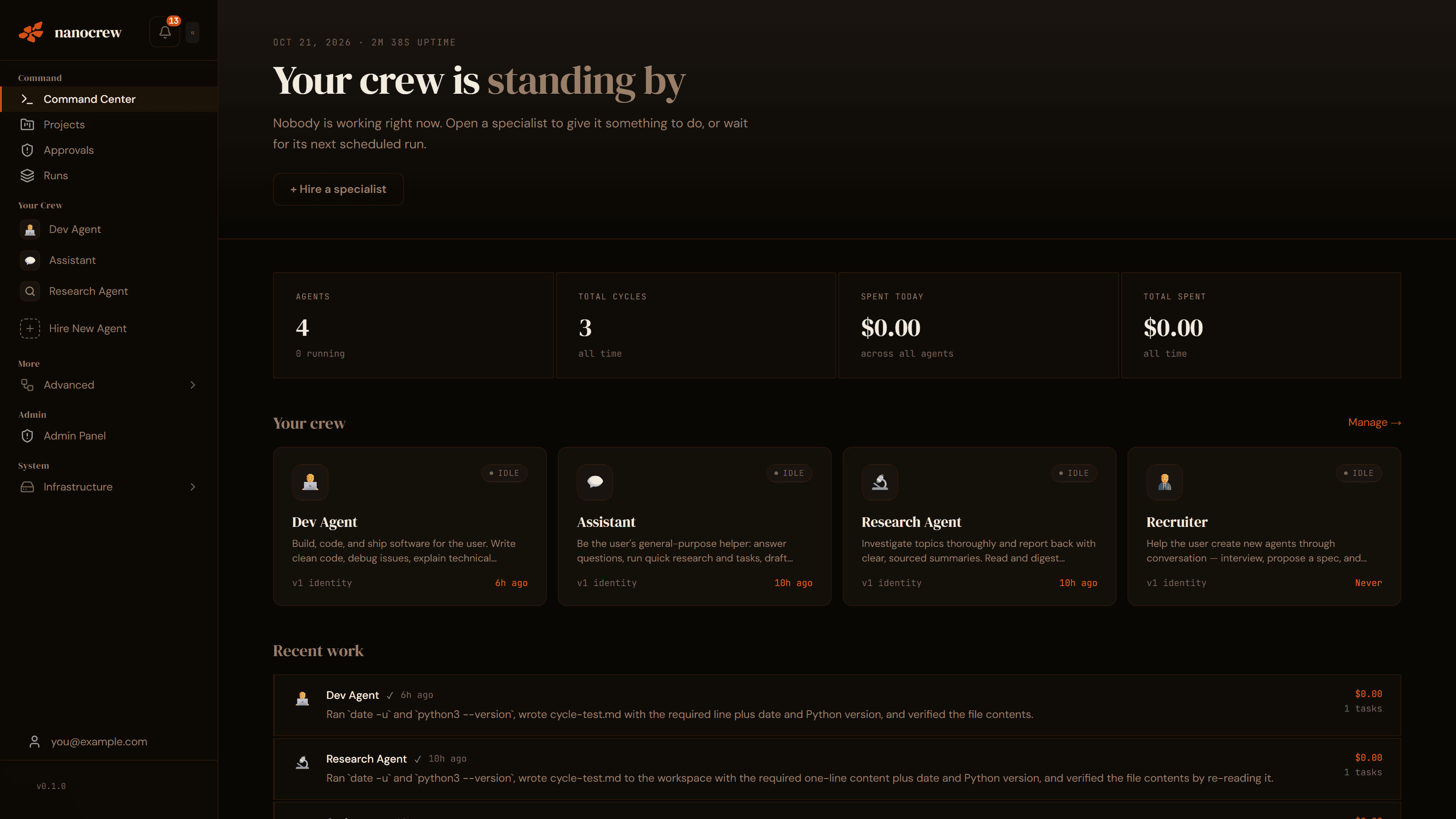
A platform for running a crew of AI agents, each with its own identity, memory, tools and schedule. Agents work in Docker sandboxes, hand tasks to each other, and ask for approval before sensitive actions. You manage the crew from a web dashboard.
An early release: expect rough edges and breaking changes. Bring your own infrastructure and model-provider keys.
01 / What it does
Separate roles.
Shared work.
Configure an agent around a job, give it the tools it needs, and keep the work visible as it runs.
A workspace for each role
Create an agent from a template or from scratch. Give it an identity, long-term memory, tools and a job.
A crew that can hand work over
Agents can message each other, hand off tasks and borrow tools. The dashboard includes a crew map.
Docker sandboxes
Agent cycles run in Docker containers with shell, files, a browser and a Python REPL inside the sandbox.
Human approvals
Sensitive actions, such as sending email, pause in an approvals inbox. Per-agent rules let you configure what requires review.
Schedules and triggers
Start work through dashboard chat, cron schedules, webhooks or the optional WhatsApp channel. Your deployment must be running.
Your choice of model
A LiteLLM gateway connects your providers with fallback models. Configure a daily budget; spend is checked after each model call.
Tools, skills and MCP
Built-in tools, on-demand Markdown skills and external MCP servers let you configure the tools available to an agent.
Work you can inspect
Review per-cycle logs, costs and run history, and see a live view of the agent's browser from the dashboard.
Roles you can configure
Examples, rather than promises of ready-made agents or guaranteed results.
Development
Provide a repository workspace and the tools for a coding task. Review the changes it produces.
Writing
Provide a brief, source material and the tools for drafting. Review the output before publishing.
Research
Provide a question and the web tools it needs. Review the findings and sources it returns.
02 / Under the hood
Your infrastructure.
A visible runtime.
The React dashboard talks to a TypeScript orchestrator. The orchestrator manages the agent containers, approvals, schedules and model relay.
Dashboard
React + Vite
Agents, chat, logs, files and approvals.
Orchestrator
TypeScript + Express + SQLite
Registry, scheduling, budgets and cycle runner.
Agent containers
The Python nanoagent runtime runs the model/tool loop with an agent workspace and scoped credentials.
LiteLLM gateway
Model calls use the gateway and configured providers. Agents receive short-lived relay tokens instead of platform provider keys.
The orchestrator needs the Docker socket, which grants powerful host access. Review the deployment guide and security policy before exposing an installation.
03 / Run it yourself
From checkout
to your first agent.
Docker with Compose v2, Node.js 20+, Bash, at least one model-provider key and at least 20 GB of free disk for the initial image build.
- 01
Clone the repository
git clone https://github.com/shivasaini04/nanocrew.git cd nanocrew cp .env.example .env - 02
Configure your local environment
In
.env, set a provider key and a matchingMODEL_PRIORITY. SetHOST_PROJECT_ROOTto the absolute checkout path, and chooseADMIN_EMAILand a strongADMIN_PASSWORD.Generate separate values for
SESSION_SECRET,SESSION_ENCRYPTION_KEY,nanocrew_SECRET_KEYandLITELLM_PROXY_KEYusing the documented setup instructions. - 03
Build and start
bash container/build.sh
npm install && npm run build
docker compose up --build
The first sandbox-image build takes time. When the dashboard API is listening, open
http://localhost:3002and sign in with your configured admin account. Compose binds the ports to localhost. - 04
Create an agent and review its work
Open Agents, choose a template or start blank, select a model and send a message. Watch the cycle in Logs and review sensitive actions in the approvals inbox. Add a schedule or webhook when you want the deployment to trigger work automatically.
04 / NanoCrew & ChatGPT
Choose what
you want to operate.
NanoCrew gives you an MIT-licensed agent platform to run and configure yourself. Compare that operating responsibility with the assistant or hosted service you are considering.
Infrastructure
You run the orchestrator, Docker sandboxes, storage and updates.
Context and tools
You configure agent identities, memory, providers, tools and integrations.
Triggers and review
You set schedules, webhooks, budgets and the approval rules for sensitive actions.
For ChatGPT's current workflows and account-specific availability, read OpenAI's official guide. NanoCrew's repository establishes its own capabilities; it does not establish another service's current feature set.
05 / Keep exploring
The code and
the details are open.
Getting started
Install, create an agent and troubleshoot setup.
Architecture
Components, cycle lifecycle and data boundaries.
Configuration
Providers, model choices, limits and access.
Deployment
Host access, TLS, backups and updates.
Writing skills and tools
Add a playbook, tool or MCP server.
Contributing
Work on the project and report reproducible issues.
Watch the project launch film
Project archive
The NanoCrew launch film
Launch film · use the README for current release scope · Press play to watch. Sound and playback are in your control.